[Announcement] Pricing update for 2026
Anycase.ai
In December 2025, we announced a pricing update that was supposed to take effect last February 1, 2026. We paused that rollout after reviewing our overhead expenses, and realized that we hadn’t factored in one of the biggest changes in our cost structure that was affecting our ability to operate sustainably: the 12% VAT compliance for digital services.
After taking some time to study our options and doing a pricing survey to hear from our customers, we’re now rolling out an updated pricing update that takes effect on March 1, 2026. This is our first price update since launching in March 2024 and officially sheds off our “early bird pricing”.
Updated pricing
All prices below are for Pro plans.
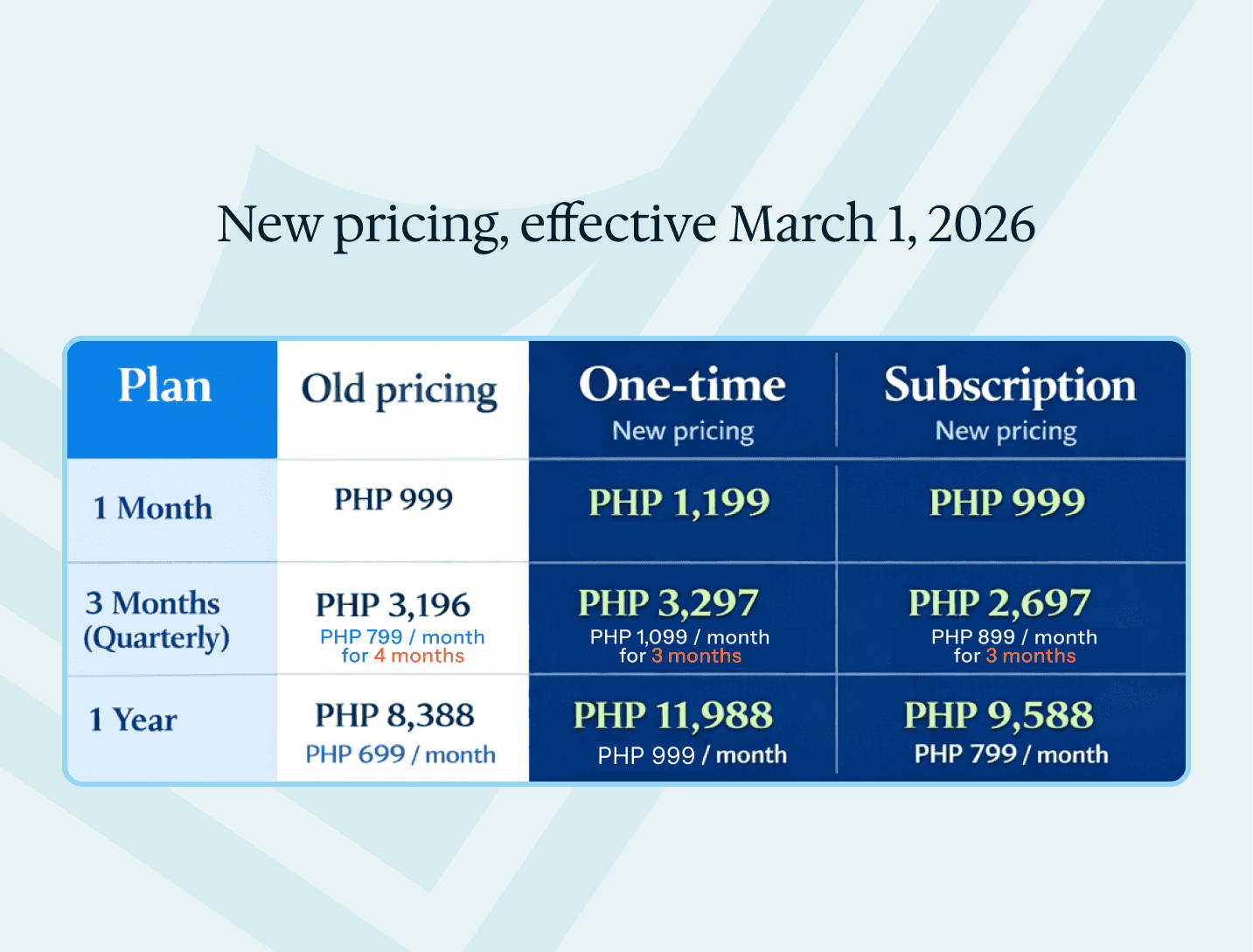
Note: The old “Quarterly” plan was a 4-month subscription. We’re replacing it with a true 3-month subscription cycle.
What’s changing
Different pricing for one-time and subscription
We’re adjusting how pricing works to better match how people actually use Anycase. Many users end up relying on it beyond a single task or case, so we’re making long-term access more affordable overall.
Both one-time and subscription plans give you the same access to Anycase. The difference is in how they’re priced over time:
Subscriptions are priced lower over longer periods, for users who plan to keep using Anycase as part of their regular workflow. These automatically renew at the end of your billing cycle.
One-time plans are still available if you’re trying Anycase for the first time or only need access for a limited period. These do not automatically renew at the end of your billing cycle.
You can check your plan type through your Profile page: https://anycase.ai/app/profile
If you start with a One-time plan and find yourself using Anycase more regularly, you can switch to a Subscription later to get the lower long-term price.
Quarterly plans are now 3 months instead of 4 months
We’re updating the old 4-month cycle to a true Quarterly (3-month) plan. This change is meant to fit more naturally with how businesses and firms handle finances, while keeping the effective monthly price close to what you were already paying.
What's the difference between One-time and Subscription plans?
One-time plans let you access Anycase whenever you need. This is ideal for users who don’t have an ongoing need for Anycase and only need access for specific periods. These plans do not auto-renew. Your access and billing end at the close of your billing cycle.
Subscription plans let you access Anycase on an ongoing basis. This is for users who consistently use Anycase and want long-term value. These plans auto-renew every billing cycle you choose (Monthly, Quarterly, or Yearly) for uninterrupted access.
You can switch subscription terms (e.g., Yearly → Quarterly) by:
Cancelling your current plan through your Profile: https://anycase.ai/app/profile
Upgrading to a new one when it expires through the upgrade page: https://anycase.ai/app/upgrade
How this pricing update affects you
If you’re on a Subscription
Your current subscription continues as-is until the end of your current billing cycle. This means you will not be charged extra, and your current price will remain the same until your next renewal.
When your plan renews after March 1, 2026, the new price will apply automatically.
If you use One-time plans
Your current access continues until the end of your billing cycle.
The new price will apply the next time you purchase access after March 1, 2026.
If you’re on a Quarterly plan
If you’re on the old 4-month plan, you’ll be moved to the new Quarterly (3-month) subscription at your next renewal. You will remain on the 4-month term until your current billing cycle ends.
Do I need to do anything?
No, you don’t need to take any action. Your current plan will continue as usual. The updated pricing only applies when your Subscription renews, or you purchase a One-time plan, after March 1, 2026.
Below are some options you can take if you want to switch plans (Monthly, Quarterly, Yearly) and subscription terms (one-time vs. subscription).
Frequently asked questions
How do I know what plan I'm on?
You can check your plan type (Subscription or One-time) and billing cycle (Monthly, Quarterly, Yearly) on your user profile: https://anycase.ai/app/profile
Will I be charged anything extra?
No, you will not be charged anything extra during your existing subscription. The updated pricing only applies when your Subscription renews, or you purchase a plan after March 1, 2026.
I'm on a One-time plan but I want to move to a Subscription. How do I do this?
Since One-time plans do not auto-renew, you can switch to a Subscription plan at the end of your billing cycle on the upgrade page: https://anycase.ai/app/upgrade
I'm on a Subscription but I want to move to a One-time plan. How do I do this?
To switch to a One-time plan, cancel your subscription. You will continue to have access for the full term of your current plan, but it will not auto-renew at your next billing cycle. You can purchase a One-time plan after it expires.
How do I change from Monthly/Quarterly/Yearly to a different plan?
You’ll need to wait until your current plan ends before changing to a different plan. If you’re on a Subscription plan, cancel your Subscription. If you’re on a One-time plan, wait for it to end.
Once your plan expires, you can choose a new plan (Monthly, Quarterly, or Yearly) and your preferred billing type (One-time or Subscription) when you upgrade again.
Can I pay / upgrade to a new plan before my current one expires?
We currently don’t support upgrading mid-cycle. What you can do is cancel your existing plan, and upgrade to a different plan at your time of renewal.
How do I cancel my current plan or subscription?
You can cancel your existing plan through your user profile. Please note that refunds will not be issued. You’ll continue to have full access until the end of your current billing cycle.
Team plans (optional)
If you’re working with a firm or a small team, we now offer a Team plan that lets you:
add or remove seats
manage billing in one place
Minimum of 2 seats and quarterly commitment per Team plan. You can learn more about the Team plan here.